
- Streaming Products
- BD-DVD products
- Useful Articles
- support
Article Editor: Young leaves
Jan 01, 2026
Experience the best music converter now!
Share this article!


Many people have the following concerns: "I canceled my Spotify membership, but I want to enjoy music offline," or "I want to save YouTube Music as MP3 and listen to it on other devices." To convert streaming music to MP3, you need a safe and reliable conversion tool.
In this article, we'll introduce 10 of the best free and online tools for converting songs from popular music services like Spotify, Apple Music, and Amazon Music to MP3. We'll also explain the advantages and disadvantages of each tool so you can choose the best one for you.
Related Posts:
Streaming music is DRM-protected, and songs downloaded from the official app are encrypted and can only be played within the app during your active membership period. If you want to play the music on other players or devices, or if you want to enjoy music offline even after canceling your membership, you will need to use a secure MP3 converter.
Below is a comparison list of safe and free MP3 converters and online sites. If you find a converter you're interested in, click on the tool name to go to the corresponding page. Choose the MP3 converter that best suits your needs.
| Free MP3 Converter | StreamByte for Music | TuneFab All-in-One Music Converter | NoteBurner All-in-One Set | ViWizard Streaming Audio Recorder | VideoProc Converter | Free HD Video Converter Factory | Sidify All-In-One Music Converter | YouTube mp3 imitation | SPOTIDOWN | flvto |
| Recommendation | ★★★★★ | ★★★★ | ★★★★ | ★★★ | ★★★ | ★★★ | ★★★★ | ★★★★ | ★★★ | ★★★ |
| Supported OS/environment | Windows/Mac | Windows/Mac | Windows/Mac | Windows/Mac | Windows/Mac | Windows | Windows/Mac | browser | browser | browser |
| Supported services | Spotify, YouTube Music, Apple Music, Amazon Music, etc. | Spotify, YouTube Music, Amazon Music, etc. | Spotify, YouTube Music, Amazon Music, etc. | Spotify, Amazon Music | YouTube, Niconico Video | YouTube, TikTok | Spotify, Amazon Music, etc. | YouTube Music, Niconico Video, etc. | Spotify | YouTube, SoundCloud, TikTok |
| Output Format | MP3, WAV, M4A (AAC), M4A (ALAC), FLAC, AIFF | MP3, M4A (AAC/ALAC), FLAC, WAV, AIFF | MP3, AAC, WAV, FLAC, AIFF, ALAC | MP3, FLAC, WAV, AIFF | MP3, M4A | MP3, MP4, AVI, MKV, WMV | MP3, AAC, WAV, FLAC | MP3, M4A, OPUS, MP4 | MP3 | MP3 |
| Lossless conversion | Possible | Possible | Possible | Possible | Not possible | Not possible | Possible | Not possible | Not possible | Not possible |
| Preserving ID3 tags | Possible | Possible | Possible | Possible | Not possible | Not possible | Possible | Not possible | Possible | Not possible |
| Conversion Speed | 35x speed | 35x speed | 10x speed | usually | usually | usually | usually | usually | usually | slow speed |
| success rate | ★★★★★ | ★★★★ | ★★★★ | ★★★★ | ★★★ | ★★★ | ★★★ | ★★★★ | ★★★ | ★★★ |
| ease of use | ★★★★★ | ★★★★★ | ★★★★ | ★★★ | ★★★ | ★★★★ | ★★★ | ★★★★ | ★★★★ | ★★★ |
"StreamByte for Music" is an MP3 conversion software that supports eight popular music streaming services, including Spotify, YouTube Music, and Amazon Music.Remove DRM protection from streaming musicAnd maximum320kbpsHigh quality sound and 35x faster speedConvert to MP3You can save it permanently by using this free software.In addition to MP3, various general formats such as WAV, MAV, M4A, etc.You can also convert the music files to MP3 format. You can play the converted music files on other players or devices. You can also play downloaded music files on other devices, regardless of your membership status.Play offline anytimeis.
You can experience all the features of "StreamByte for Music" for free, so please download it and use it.
StreamByte for Music
This is the perfect music converter for those who want to enjoy streaming music with the original sound quality. It supports multiple music platforms and allows you to save music while maintaining high sound quality.
Main features of StreamByte for Music and why we recommend it
How to Convert and Download Music to MP3 with StreamByte for Music
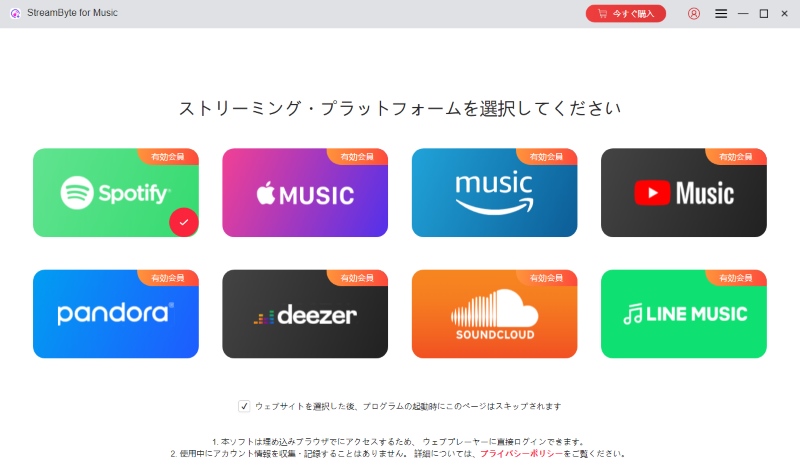
step 1After launching and logging in to StreamByte for Music, you will see eight popular music streaming services on the main interface. Select the service you want to convert. Here we will take Spotify as an example.
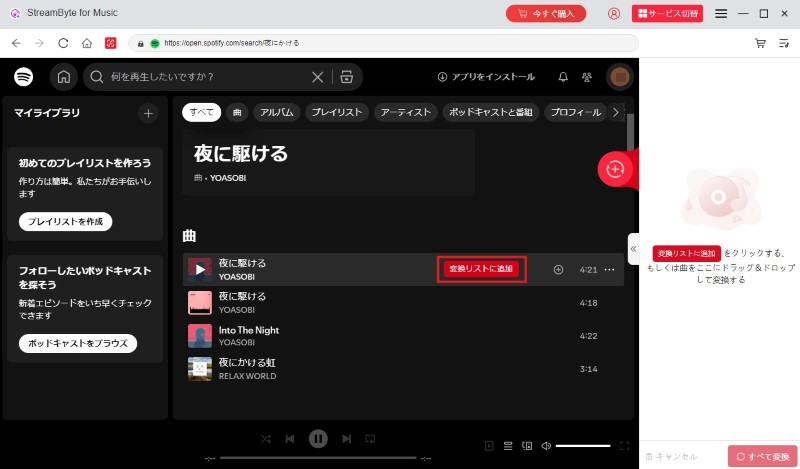
Step 2Log in to Spotify with your account and search for the music you want to convert to MP3. Once you find the music you like, you can add it to the conversion list by clicking the "Add to Conversion List" button or by dragging and dropping. It supports batch downloading, so you can add multiple songs, albums, and playlists at once.
Step 3Select MP3 as the output format, and you can freely adjust output settings such as bit rate and save directory.
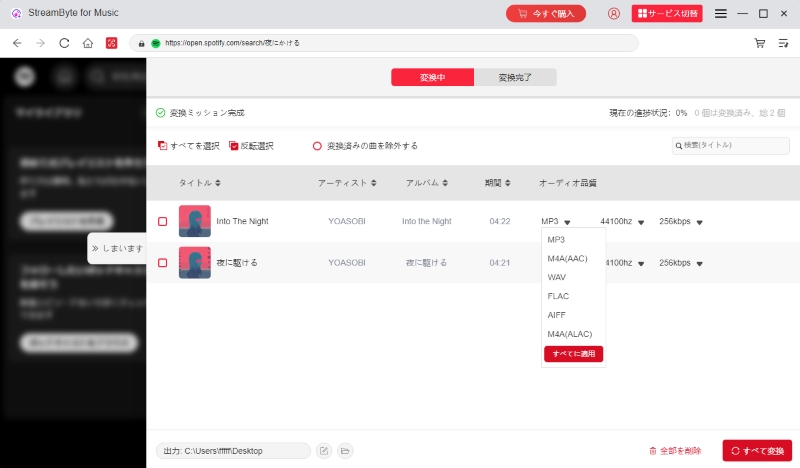
Step 4After adjusting the settings, click the "Convert All" button at the bottom right to start the MP3 conversion. You can monitor the conversion progress on the screen and the completed music will be listed under the "Converted" tab.
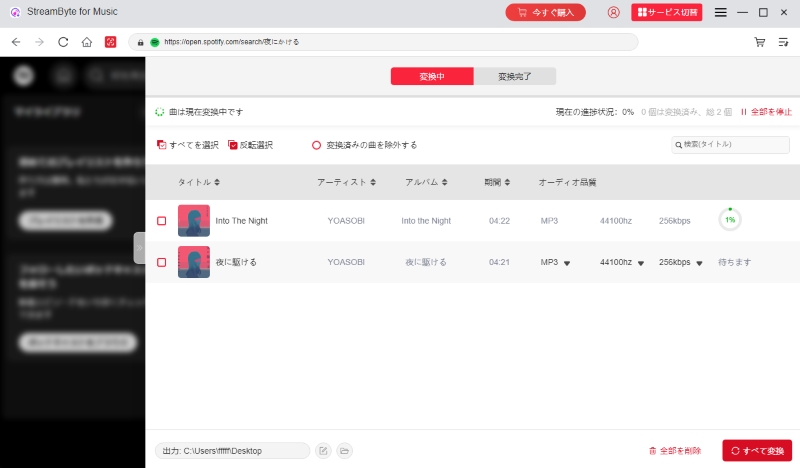
With these simple steps,Convert and download Spotify music to MP3You can.StreamByte for Music" supports eight major music streaming services, including Spotify, YouTube Music, Amazon Music, and Deezer. You can convert your favorite songs to MP3, M4A, and other formats for playback. Take this opportunity to download the software for free and enjoy music more comfortably.
100% safe and virus free
100% safe and virus free
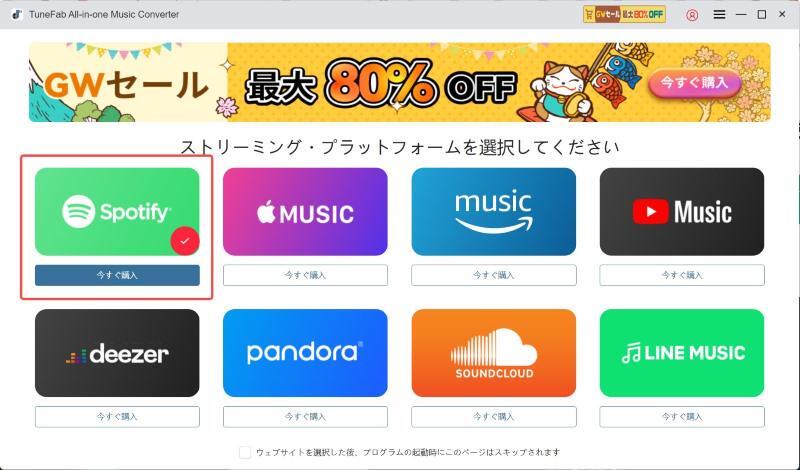
"TuneFab All-in-One Music Converter" is software that can convert streaming music to formats such as MP3, M4A, FLAC, etc. You can download high-quality music at 320kbps from music services such as Spotify, Apple Music, YouTube Music, etc. at a conversion speed up to 35 times faster. In addition, the softwareBuilt-in browserYou can search and save your favorite songs directly on theBulk download functionIt also comes equipped with
Advantages:
Cons:
"TuneFab All-in-One Music Converter" is also an excellent software, but if you are looking for more stability, we recommend the best MP3 converter software "SStreamByte for MusicThis software boasts a high conversion success rate of 99% and allows you to quickly convert and download streaming music to MP3 format while maintaining lossless sound quality.
100% safe and virus free
100% safe and virus free
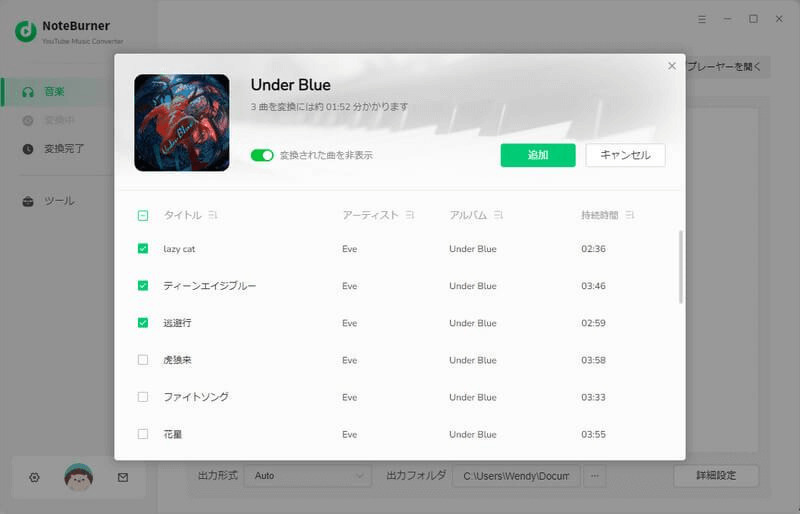
"NoteBurner YouTube Music Converter" is an MP3 converter that supports eight music streaming services, including Apple Music, Spotify, and YouTube Music. It can convert up to 10 ...10x speedHigh-speed conversion and download is possible. The biggest feature isCD burning functionIn addition to being equipped with the song title, artist name, album information, etc.Preserve ID3 tagsYou can convert it to MP3 as is.
Advantages:
Cons:
If you value stability and functionality, we recommend the free music MP3 conversion software "StreamByte for MusicWe recommend ". This software offers stable operation, high-speed conversion up to 35x, and supports conversion to major audio formats such as MP3, AAC, and FLAC.
100% safe and virus free
100% safe and virus free
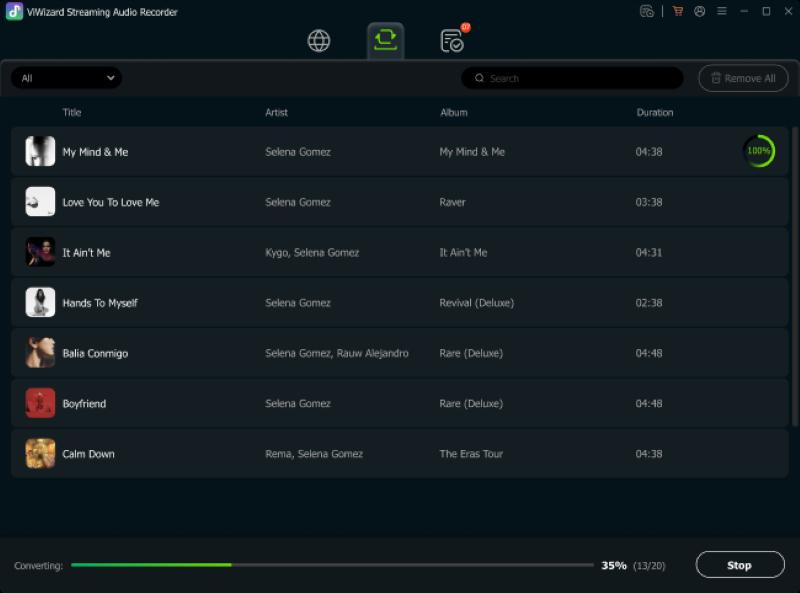
"ViWizard Audio Converter" is a free software that can convert music from major music streaming sites such as Spotify, Amazon Music, and TIDAL to MP3, M4A, AAC, and other formats. It can also be used to convert music from other music streaming sites such as Spotify, Amazon Music, and TIDAL to MP3, M4A, and AAC ...Customize output settings freelyIn addition, several songsBulk conversionIt also supports. In addition, when downloading music,Edit ID3 tag informationcan also be done.
Advantages:
Cons:
For those who are not good at English,StreamByte for Music" is the best choice. Everything from the operation guide to the software display is written in natural Japanese. What's more, even after the music analysis, you can freely change output settings such as the output format and bit rate.
100% safe and virus free
100% safe and virus free
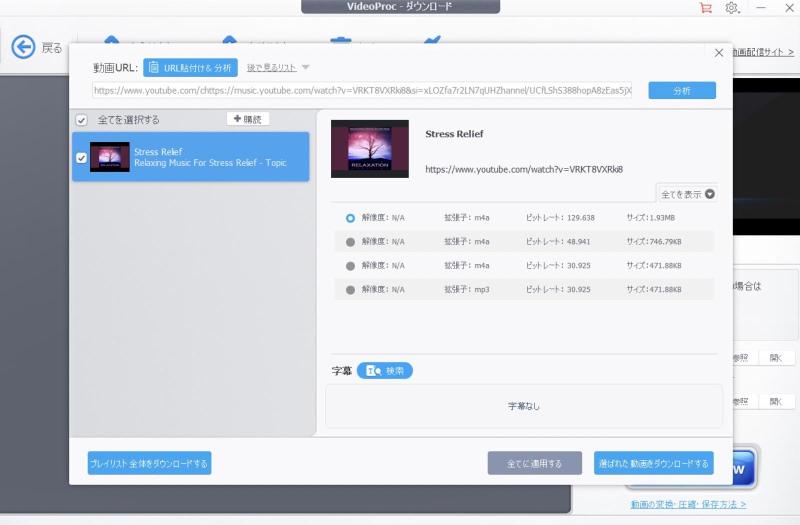
"VideoProc Converter" from the video fileExtract AudioThis software can be used to download and save as MP3 music files.Copy the URL from the video sharing siteAfter downloading the video, you can convert it into a music file. It also has the ability to convert to various audio formats and simple editing functions.
Advantages:
Cons:
"VideoProc Converter" can extract audio from videos and convert it to MP3, but it does not support DRM-protected music from music streaming services such as Spotify and YouTube Music.StreamByte for MusicWe recommend using "Download Music from Spotify, YouTube Music, and other streaming services." This software allows you to download music from Spotify, YouTube Music, and other streaming services. You can also use the built-in browser to search for and download music directly within the software.
100% safe and virus free
100% safe and virus free
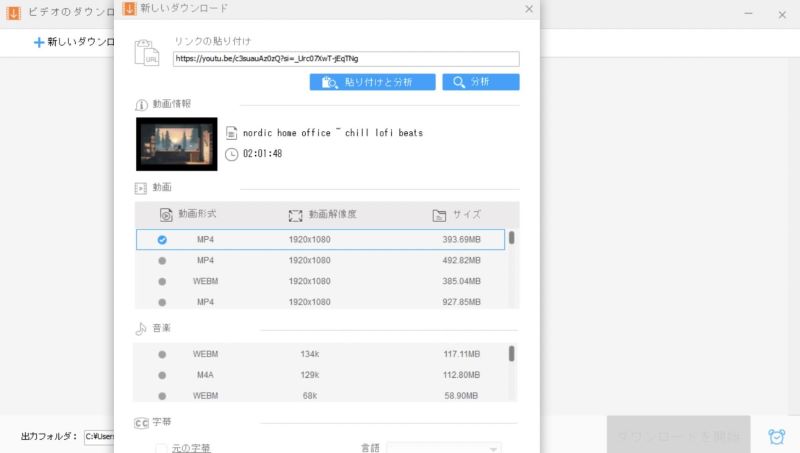
"Free HD Video Converter Factory" is free software that allows you to download music from YouTube and TikTok, and convert video and audio files to MP3 format. It supports a variety of video formats, including MP4, AVI, and MKV, and allows you to convert to MP3 with simple operations. You can also upgrade to the paid version to access DVD ripping functionality.
Advantages:
Cons:
"Free HD Video Converter Factory" is a free and easy-to-use MP3 conversion software, but you will need to upgrade to the paid version to convert 4K video formats or save music in high quality. Also, in some cases, you may not be able to convert music from YouTube to MP3. StreamByte for Music" allows you to easily and efficiently convert YouTube music to MP3 format, allowing you to enjoy a comfortable music life without compromising the music quality.
100% safe and virus free
100% safe and virus free
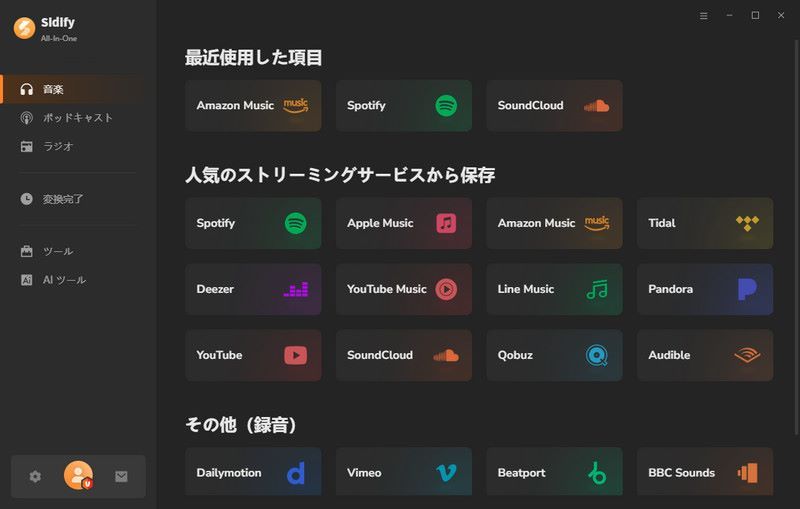
"Sidify All-In-One Music Converter" is software that can convert music from music streaming services such as Spotify, Amazon Music, Apple Music, and YouTube Music to MP3 and other popular formats. In addition to streaming music, it can also record and save podcasts and radio programs. It supports high-speed conversion at 10x speed and supports high-quality output at 320kbps.
Advantages:
Cons:
Users of "Sidify All-In-One Music Converter" often complain about failures in analyzing and downloading music URLs. If you want to convert streaming music to MP3 more stably and efficiently, we recommend "Sidify All-In-One Music Converter," which boasts a high conversion success rate of 99%.StreamByte for MusicPlease consider using ".
100% safe and virus free
100% safe and virus free
Official website: https://receive.shamimomo.net/YouTubeMP3modoki/
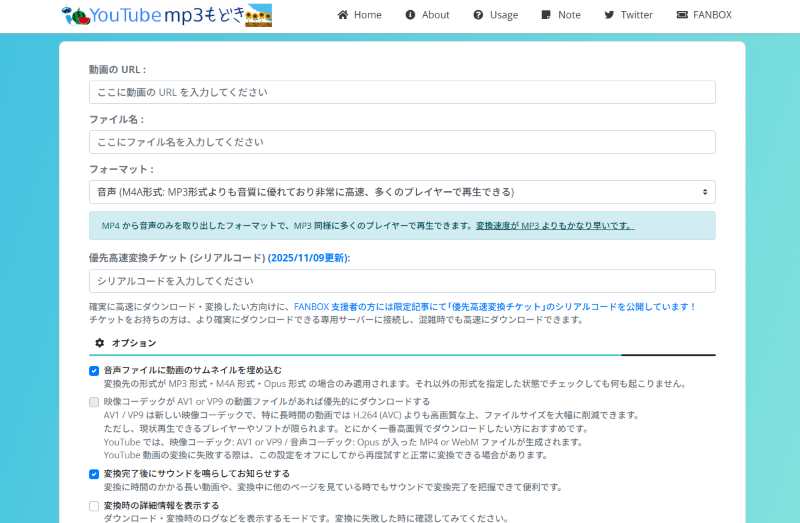
"YouTube mp3 imitation" is a completely free video and music conversion site. It supports many sites, including YouTube, Niconico Video, and SoundCloud. It's simple to use; just paste the URL of your favorite video or music and it will convert it to MP3 format and download it. It doesn't require any software or app installation, and can be easily accessed from your browser.
Advantages:
Cons:
"YouTube mp3 imitation" is reliableYouTube to MP3 Converter SiteHowever, there are drawbacks such as long server waiting times when saving music and slow conversion speeds.StreamByte for Music" allows you to convert streaming music up to 35x faster while maintaining lossless audio quality.
100% safe and virus free
100% safe and virus free
Official website: https://spotidown.app/en1
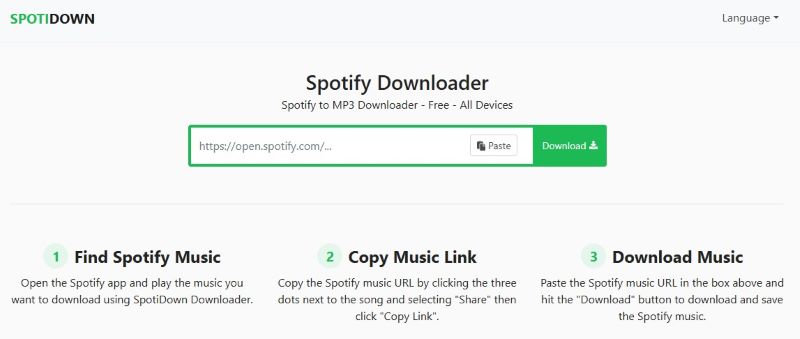
"SPOTIDOWN" is a completely free online Spotify MP3 converter. You can download not only individual songs but also entire albums and playlists. The process is simple: just copy and paste the song URL from the official Spotify app or website to easily save it.
Advantages:
Cons:
"SPOTIDOWN" is a specialized site that allows you to download Spotify songs to MP3, but it does not support Japanese and has some inconveniences such as not being able to choose the output sound quality or format.StreamByte for Music" supports multiple languages, including Japanese and English, and allows you to freely customize the output sound quality and format.
100% safe and virus free
100% safe and virus free
Official website: https://flvto.bz/jp18/youtube-to-mp3
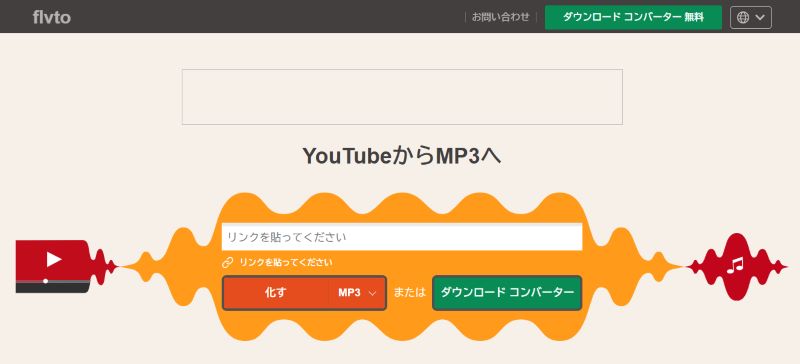
"flvto" is a free site that lets you convert videos and audio from YouTube, SoundCloud, TikTok, and other platforms to MP3. You can convert YouTube videos to MP4 or extract audio and save it as MP3. Its fast analysis of music URLs and MP3 conversion speeds make it easy to download your favorite YouTube music.
Advantages:
Cons:
100% safe and virus free
100% safe and virus free
There are many MP3 conversion software programs and websites available today, but how do you choose the best one? Here are some points to consider when choosing free MP3 conversion software and online websites. Choose the best MP3 conversion tool based on your needs, taking into account factors such as functionality and safety.
SafetyWhen choosing MP3 conversion software or a website, the most important thing to consider is safety. Some online sites display suspicious advertisements and may contain malware or viruses, posing a risk of personal information leakage or virus infection. To protect your privacy and security, we recommend using a reliable tool.
FunctionalityFor users of MP3 conversion tools, ease of use, processing speed, and conversion success rate are very important. Software that is intuitive, powerful, and fast will allow for comfortable use.
Supported formatsThere are a variety of audio file formats, including MP3, M4A, WAV, and AAC. Since different MP3 conversion software and websites support different formats, it's important to choose a tool that supports the format you want to use. Make sure in advance that the format you need can be converted.
Conversion Speed: When converting large audio files or downloading albums or playlists in bulk, fast conversion speed is important. Using a fast MP3 conversion tool will help you work more efficiently. However, some online tools are unstable and prone to conversion failures, and can take longer than expected.
As you can see, even the free trial version of "StreamByte for Music" allows you to fully experience its usability, so it can be safely recommended to those using free MP3 conversion software for the first time. It offers a good balance of safety, functionality, and supported formats, so it's definitely worth trying out for those who have felt dissatisfied with other free software.
Free music/MP3 conversion software is convenient, but you should be aware of the following points when using it.
Restrict to personal use: There is no problem with converting streaming music to MP3 for personal enjoyment, but uploading it to social media or using it commercially without permission may result in legal issues. Please make sure to use it only for personal use.
Use reliable software: MP3 conversion tools, especially online conversion sites, may contain advertisements and unwanted programs, increasing the risk of personal information leakage and malware infection. To protect your privacy, we recommend using trusted software.
Download from the official website: Software provided on official websites is guaranteed by the developer for its sound quality and offers technical support. For safety and quality, always download from the official website.
Songs downloaded from official music streaming service apps are DRM-protected and are encrypted when stored. Downloaded songs can only be played within the official app.
If you want to convert your favorite music to MP3 format, consider using the MP3 conversion software or websites mentioned above. This will allow you to convert DRM-protected songs to the versatile MP3 format. Music files converted to MP3 can be played on various players, as well as on smartphones, computers, etc.Transfer to USB memoryYou will also be free to do so.
In this article, we have introduced in detail seven carefully selected free MP3 conversion software and three MP3 conversion websites. All of them are safe and free to use, but each has its own characteristics and shortcomings. Among them, we particularly recommend "StreamByte for Music" is a music conversion software.
"StreamByte for Music" allows you to listen to music from music streaming services such as Spotify, Deezer, YouTube Music, etc.Remove DRM protectionAnd MP3, AAC, etc.Convert to a variety of formatsThe downloaded music is DRM-free, so you can download it on your PC, tablet, smartphone, game console, etc.Play on any deviceYes, you can. Even if you are not a member of a music service, you can always play downloaded music offline. "StreamByte for Music" offers a free trial version, so download it now and try it out.
100% safe and virus free
100% safe and virus free
Born in Tokyo. Studied music culture at Tokyo Woman's Christian University, and after graduating, worked in the music distribution and download industry, gaining experience as an editor and writer. Has a deep understanding of a wide range of music genres, from rock, J-POP, classical, and metal, and is familiar with major services such as Spotify, Apple Music, and YouTube Music.
He has written over 300 articles, with a total of 6 million page views. He strives to provide accurate and easy-to-understand information so that readers can enjoy music more conveniently and safely. He currently writes articles for the StreamByte editorial department, focusing on how to use and utilize music download and conversion software.
Read more articles together
Experts in supporting offline listening of streaming music services
Subscribe to StreamByteCopyright © 2026 StreamByte. All rights reserved.



Get the latest news, product upgrades, information, guides, discounts and more about StreamByte.
Please enter a valid email address.



 English
  Japanese
  Chinese (traditional)
  German