
- Streaming Products
- BD-DVD products
- Useful Articles
- support
Article Editor: Young leaves
Jan 01, 2026
Experience the best music converter now!
Share this article!


Spotify is one of the world's largest music streaming services, boasting over 100 million songs and attracting many users. There are many reasons why people want to download music from Spotify, such as when they can't listen to music on the train because of poor network connectivity or when they want to enjoy their favorite songs while on an airplane. However, Spotify offers two pricing plans: a free plan and a premium plan (1,080 yen per month), and you must subscribe to the premium plan to download music.
So, if you're not a premium member, can you download Spotify music and play it offline? This article will explain in detail how to download Spotify songs for free. With these methods, you can freely save and enjoy your favorite songs from Spotify, whether you're a free or premium member. Please read to the end.
Related Posts:
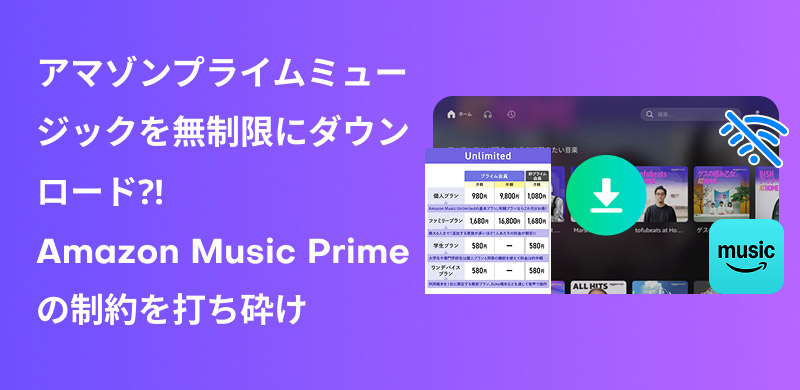
Amazon Prime Music is a music streaming service for Prime members provided by Amazon. Amazon Prime members can listen to over 100 million songs and podcasts at no additional charge, and can use features such as shuffle playback, song downloads, and offline playback.
On Spotify,Free Plan"and"Premium Plan" We offer two types of pricing plans. The presence or absence of advertisements, availability of download function, sound quality, etc. differ depending on the plan.
Comparison chart of Spotify's free and premium plans
| Plan Type | Free Plan | Premium Plan |
| Fee | free | 980 yen per month |
| Sound quality | Up to 160kbps | Up to 320kbps |
| advertisement | can be | none |
| Next/Previous Song | Up to 6 times per hour | Unlimited |
| Music downloads | Not possible | Possible |
| Offline playback | Not possible | Possible |
Spotify's free plan does not allow you to download music or play it offline. Downloading songs is a feature exclusive to Spotify Premium members,First-time users get a one-month free trialTherefore, new users can download songs for free for one month and play them offline without any additional charges if they sign up for a premium plan and cancel before the billing date.
Tip
In the next section, we will show you how to download songs for free using the official Spotify app, depending on your device: smartphone or computer.
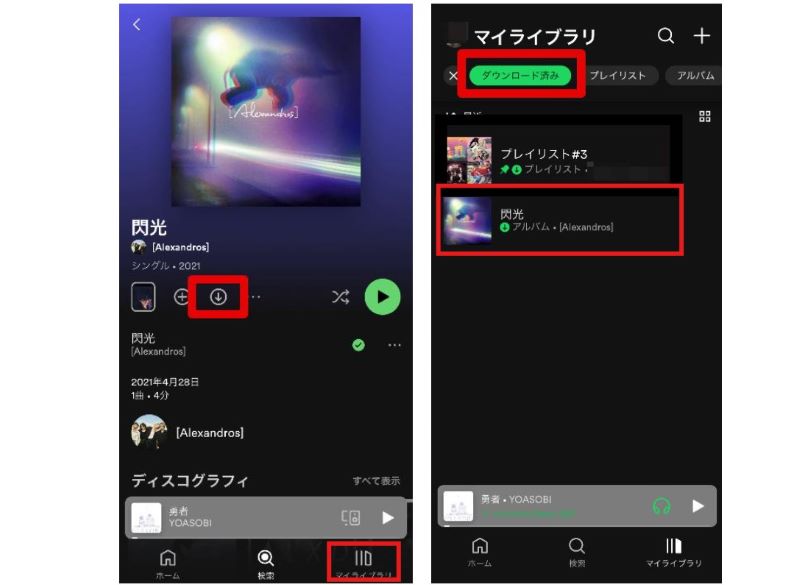
step 1Launch the Spotify app on your iPhone or Android phone, search for and open the playlist, album, or podcast you want to download. Since you can't download individual songs, you can add individual songs to a playlist and download them.
Step 2Tap the "↓" button that appears to start downloading Spotify music.
Step 3Go to the "My Library" tab and tap "Downloaded" to play the displayed Spotify songs offline.
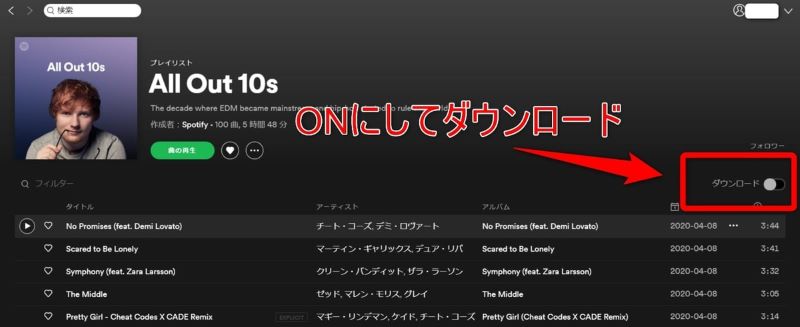
step 1Launch the Spotify desktop app and search for the album or playlist you want to download.
Step 2Open an album or playlist and turn on the "Download" switch next to the cover art or title.
Step 3Toggle the "Download" switch to green to start downloading Spotify songs.
Disadvantages and points to note about the official Spotify download function
During the free trial period of Spotify Premium, downloading music is very convenient and you can listen to high-quality music smoothly anytime, anywhere without worrying about data usage. However, there are many limitations as mentioned above.
After the one-month free trial of Spotify Premium ends, you will no longer be able to use the download feature unless you purchase a subscription. Additionally, DRM protection prevents offline playback of songs that have already been downloaded. Furthermore, content downloaded with the Spotify app may be erased if you do not connect to the Internet once every 30 days, so regular online authentication is required.
To download songs from Spotify for free, you need a professional music converter.StreamByte for Music" is recommended. With this software, you can listen to music on Spotify regardless of whether you have a free plan or a premium plan.Remove DRM protectionYou can do it from SpotifyLossless Sound QualityYou can convert and download songs to your computer in MP3 format.There is no shelf lifeYou don't need to authenticate once every 30 days, and you can play it freely even after canceling your membership. In addition, even if you are using Spotify's free plan,Without adsA major feature is the ability to convert and store music locally.
Also, SpotifySave a single songNot only that, but also one of multiple songs, albums, and playlistsBulk downloadIt also supports song titles, artist names, album names, etc.Freely edit and save ID3 tag informationIf you want to download and enjoy Spotify music for free, be sure to download and try out "StreamByte for Music."
StreamByte for Music
This is the perfect music converter for those who want to enjoy streaming music with the original sound quality. It supports multiple music platforms and allows you to save music while maintaining high sound quality.
Main functions and features of StreamByte for Music
Next, we will explain how to use "StreamByte for Music" to freely download and save your favorite songs, albums, and playlists, even if you are a Spotify free member.
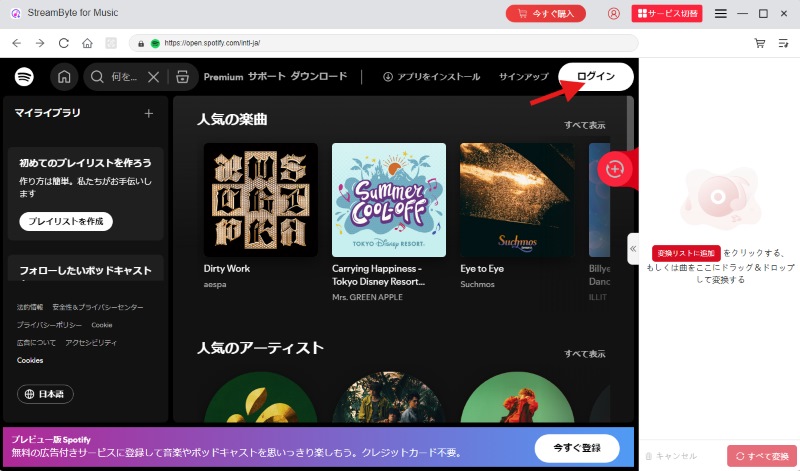
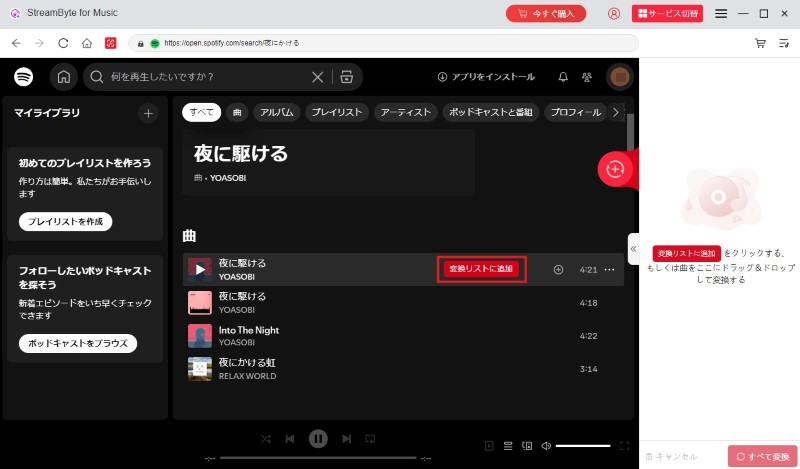
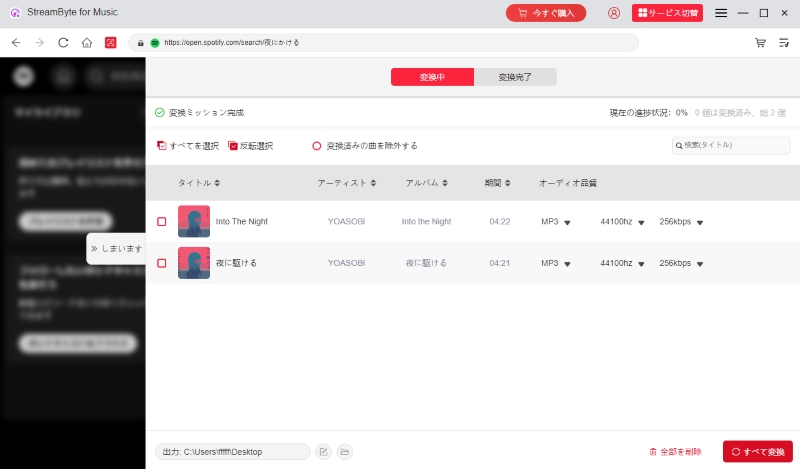
step 1,
Install and run "StreamByte for Music" on your computer, access the built-in Spotify web player and log in with your Spotify account.
Step 2,
Find the songs, albums, playlists or podcasts you downloaded from Spotify and click the "Add to Conversion List" button or drag and drop the music to the conversion list on the right.
Step 3,
In the conversion list, you can freely specify output settings like output format, bit rate, sampling rate, etc. for single Spotify song or the whole list. After the settings are done, click "Convert All" to download all added Spotify songs at once.
Step 4,
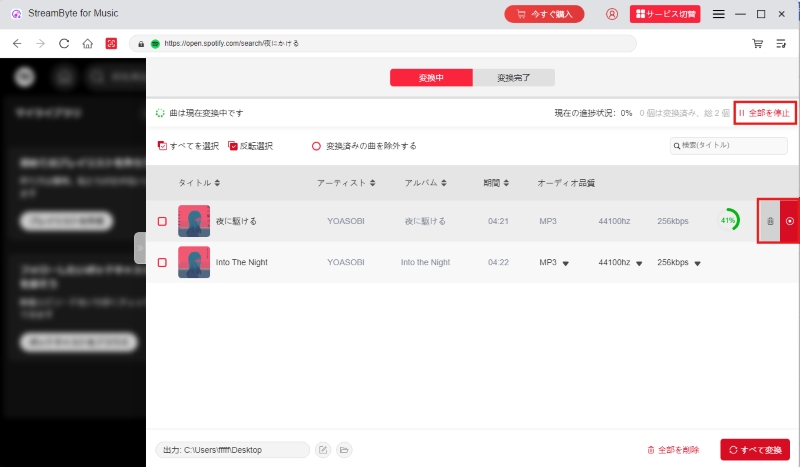
You can see the progress of your Spotify music download on the "Converting" screen. You can also stop the download process by clicking the red stop icon next to the song. Click it again to start downloading the song again.
Step 5,
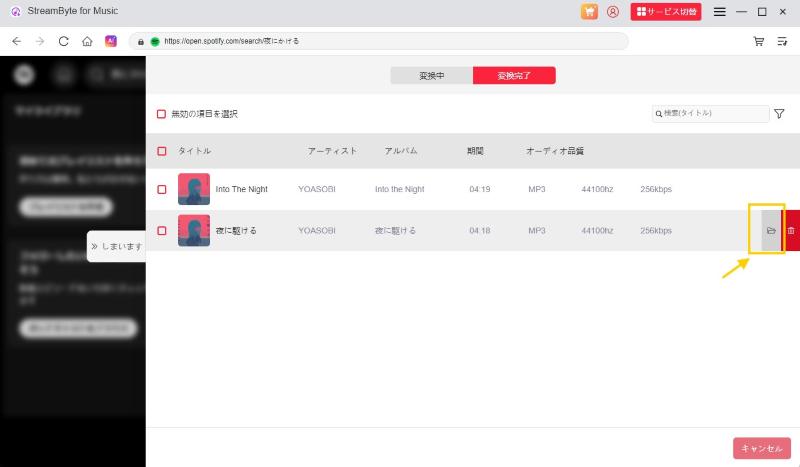
Once the Spotify songs are downloaded, you can check the conversion history under the "Conversion Completed" tab. Click the folder icon next to the song name to access the saved location and play the downloaded Spotify songs offline.
"StreamByte for MusicBy following the simple steps above, even if you are a Spotify free member, you can convert and download music to your computer using Spotify Music Converter.High quality sound at 320kbpsConvert Spotify songs to MP3 and other common formats while maintaining the original quality, so you can listen to them on your smartphone, tablet, iPod, etc.Playable on a variety of devices and playersIn this software,Free trialWe have prepared a variety of options, so please give them a try.
100% safe and virus free
100% safe and virus free
"SpotiDownloader" is a free app that allows you to easily download Spotify music.Online siteThe biggest feature is,No account registration requiredIt supports Japanese and has a simple and intuitive interface, so even beginners can easily operate it. You can also download multiple songs at once.Bulk download functionis also useful.
However, there are some restrictions. The supported formats areMP3 onlyIt does not support high quality sound. In addition, when downloading an album or playlist, you mustadvertisementYou need to watch it. Also, the site itselfUnstableHowever, there is also the disadvantage that the download success rate is low.
step 1Open the Spotify app and find the song you want to download. Tap "..." on the right and select "Copy Link" from the share button.
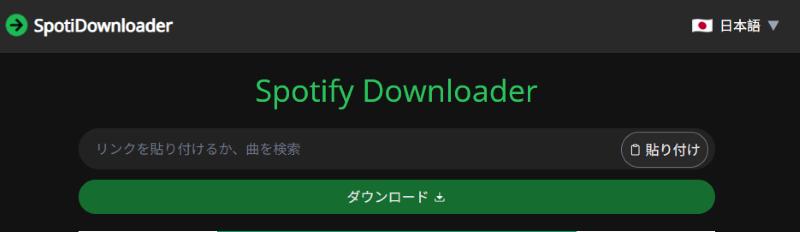
Step 2Paste the copied link into the search bar of "SpotiDownloader". Click on the "Download" button to start processing the link.
Step 3Once the process is complete, click the Download button next to the song you want to download to save the Spotify songs.
While the free Spotify online music download site is convenient, it has some drawbacks, such as no guarantee of security and a lot of ads. To solve these problems, we recommend using a music download software that supports 320kbps high quality sound, has no ads, and is highly reliable in terms of security.StreamByte for Music" is recommended.
100% safe and virus free
100% safe and virus free
We've introduced three ways to download music from Spotify: the Spotify app, dedicated music download software, and online websites. We've compiled a comparison table below to help you decide which method is best for you.
| Comparison items | Spotify app | Spotify Downloader | Online conversion site |
| Spotify Premium | necessary | no need | no need |
| Free download period | 1 month (first-time Premium users) | Download forever without premium (The free version saves the first 3 minutes of each song) |
forever |
| Download speed | high speed | Up to 35x speed | low to medium speed |
| Supported formats | Format conversion not possible | MP3/WAV/FLAC/AIFF/M4A (AAC, ALAC) | MP3 |
| Edit ID3 tags | ✕ | 〇 | ✕ |
| Playback device restrictions | can be | none | none |
| Offline playback period | can be | none | none |
| Advertisement display | Free plan available | none | can be |
| Safety | ★★★★★ | ★★★★★ | ★★★ |
The download feature available during Spotify's Premium free trial is stable and convenient, but the free download period and offline playback period are limited. Due to DRM protection, songs can only be played within the app and cannot be played on external devices or players, and there are various other restrictions.
You can also use online conversion sites that specialize in Spotify to download and save songs without a premium membership, but there are drawbacks, such as poor sound quality, ads, and unstable servers.
If you are concerned about the limitations of the official Spotify download feature and value high sound quality and security, we recommend using the music download software for Spotify, "StreamByte for MusicWe recommend using this software. Even if you are a free member of Spotify, you can convert your favorite songs to various formats such as MP3 and AAC in lossless sound quality and download them. You can freely play saved songs on external players without worrying about offline playback limits or device restrictions.Save to USB memoryYou can also download and share your music on other devices. Download "StreamByte for Music" for free and experience its high functionality!
100% safe and virus free
100% safe and virus free
Spotify's music download feature and offline playback are benefits exclusive to premium members. If you cancel your membership, not only will you no longer be able to use the download feature, but you will also no longer be able to play songs that you have already downloaded offline. Please also note that if you do not connect the Spotify app to the Internet for more than 30 days, your downloaded songs may be erased.
If you want to enjoy the songs downloaded from Spotify without any restrictions, we recommend using the professional music converter introduced in this article.StreamByte for MusicPlease try it out. With this software,Download Spotify songs in MP3 formatThis means that the music you save has no expiration date or device restrictions and can be played anytime, anywhere.
Where do I save downloaded songs from Spotify?You can view them in the app, specifically in the "My Library" tab on the PC or mobile app, as downloaded playlists and albums. They are protected by DRM (digital copyright protection technology) and cannot be accessed directly from the device's file system.
Spotify does not allow you to download individual songs from the search page, only single, album, or playlist downloads. As a workaround, you can create a new playlist in the Spotify app and add only the one song you want to download.
A more convenient way is to use "StreamByte for Music" is recommended. With this software, you can download Spotify music on a single song basis, as well as download multiple songs, albums, and playlists at once.
100% safe and virus free
100% safe and virus free
The download function and offline playback are features exclusive to Spotify Premium members. You cannot download songs with the free plan. If you want to download songs, you will need to subscribe to a paid premium plan.
However, as explained in this article, you can download albums and playlists and play them offline at no additional cost during the one-month free trial of Spotify Premium available to first-time users.
Even if you are not eligible for the free trial, you can still download Spotify music for free using third-party tools. Using Spotify music download software, you can convert and save songs to formats like MP3 with high quality and speed, even without becoming a premium member.
There is no Spotify music download software for iPhone. There are also several free music download tools for Android smartphones, but they run the risk of being infected with viruses or malware during installation or use, and many of them have insufficient security measures, which could damage your smartphone.
If you want to safely download and save Spotify songs to your smartphone for free, we recommend using the highly secure music downloader for PC introduced in this article.StreamByte for MusicWe recommend using Spotify Music Converter. You can convert your favorite Spotify songs to MP3 or other formats, save them, and then transfer the music files to your iPhone or Android smartphone, allowing you to play Spotify music offline for free on your smartphone.
100% safe and virus free
100% safe and virus free
In this article, we have introduced three ways to download Spotify music for free: using the download function of the Spotify app, using professional music download software, and using online music conversion sites. Please compare and consider the features and precautions of each method and choose the one that suits your needs.
Among them, we recommend using specialized music download software that is compatible with Spotify.StreamByte for MusicBy using "Spotify Free Membership", you can download songs in MP3, AAC, WAV, and other formats while maintaining the original sound quality.Unlimited offline playbackNot only can you download music, but you can also play it on various devices such as smartphones and iPods. It also has a function to download albums and playlists in bulk, making music downloading more efficient.
A free trial version of "StreamByte for Music" is available, so please download it and try it out.
StreamByte for Music
This is the perfect music converter for those who want to enjoy streaming music with the original sound quality. It supports multiple music platforms and allows you to save music while maintaining high sound quality.
Born in Tokyo. Studied music culture at Tokyo Woman's Christian University, and after graduating, worked in the music distribution and download industry, gaining experience as an editor and writer. Has a deep understanding of a wide range of music genres, from rock, J-POP, classical, and metal, and is familiar with major services such as Spotify, Apple Music, and YouTube Music.
He has written over 300 articles, with a total of 6 million page views. He strives to provide accurate and easy-to-understand information so that readers can enjoy music more conveniently and safely. He currently writes articles for the StreamByte editorial department, focusing on how to use and utilize music download and conversion software.
Read more articles together
Experts in supporting offline listening of streaming music services
Subscribe to StreamByteCopyright © 2026 StreamByte. All rights reserved.



Get the latest news, product upgrades, information, guides, discounts and more about StreamByte.
Please enter a valid email address.



 English
  Japanese
  Chinese (traditional)
  German